
English for Designers – Class 18

(Alignment of Objects – Part 02)
(Alinhamento de Objetos – Parte 02)
1) Read the text in Portguese. Then read its English version and record your reading to
compare it to what you heard.
(Leia o texto em português. Em seguida, leia a versão inglesa e grave sua leitura para
compará-la com o que ouviu).
Portuguese
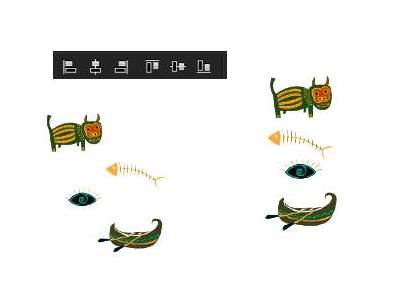
Quando se alinha um grupo de objetos, por exemplo, em um plano
vertical e as opções Align to selection ou Align to Artboard estiverem
desativadas, é normal que o Illustrator procure uma média entre os
elementos e os alinhe em um canto qualquer em seu documento.
Para que um determinado objeto permaneça fixo em uma parte
qualquer do seu documento e que as demais se alinhem tendo
ele como referência, basta selecionar todos os objetos que se deseja
alinhar e em seguida, simplesmente clique sobre o objeto de referência
e faça o processo de alinhamento.
English
When a set of objects is aligned, for instance, in a vertical plan and the
options Align to selection or Align to Artboard are activated, it is normal
that Illustrator searches for an average among the element and align
them on any corner of your document.
In order to keep an object fixed on any part of your document and that
the other cab be aligned by having it as a reference, it is just necessary
to select all of the objects that one wants to align in sequence, simply
by clicking on the object of reference and by making the
alignment process.
Questões
Casos de Sucesso
Carolina Lauton
Farmacêutica
Farmacêutica
Danielle Santos
Enfermeira
Enfermeira
Renata Hideko
Marketing
Marketing
Vinícius
Engenheiro
Engenheiro
Teachers Arlei e Beatriz
Teachers Arlei e Beatriz
Teachers Arlei e Beatriz

Você precisa fazer o login para publicar um comentário.